Shooting tips · LightingVideo Lighting for Business Videos
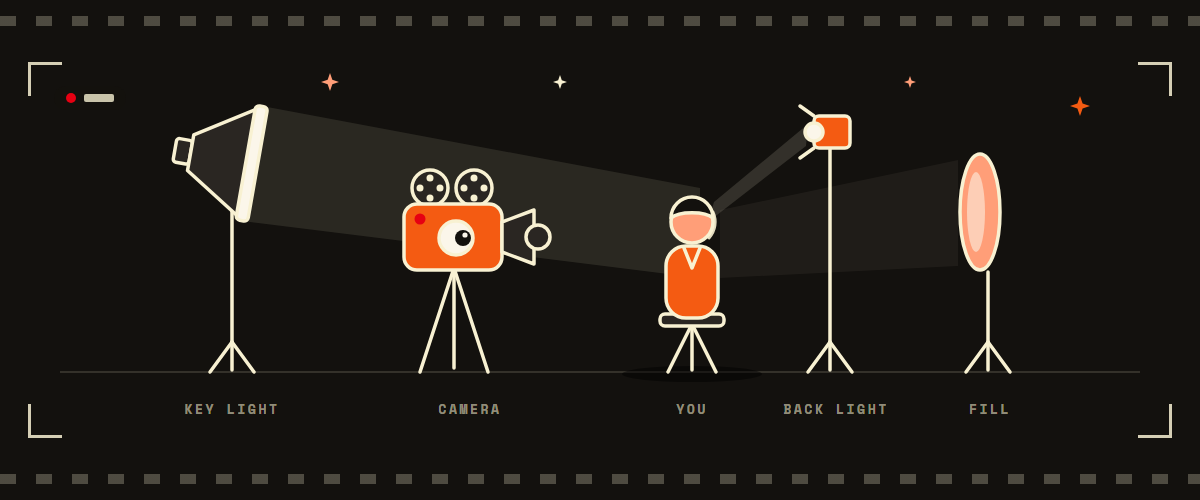
Good video lighting comes down to three lights: a large, soft key light on the face from one side, a weaker fill light or reflector on the other side to soften the shadows, and a back light behind the person to separate them from the background. Switch off the overhead lights, use one colour of light throughout, and keep the face brighter than the background.
Viewers forgive a lot in a business video: an average camera, a plain office, a few stumbles in the script. What they notice straight away is bad light. A face in shadow looks tired, a bright window behind someone turns them into a silhouette, and the flat white light of an office ceiling makes even a confident CEO look unwell. The good news is that video lighting is mostly about where you put the light, not how much you spend on it.
Three-point lighting, explained simply
Almost every interview, talking-head video and podcast you have seen uses some version of three-point lighting. Each light does one job.
- Key light: the main light. Place it about 30 to 45 degrees to one side of the camera and slightly above eye level, pointing down at the face. Make it as large and soft as you can: a softbox, a diffused LED panel or a big window.
- Fill light: softens the shadows. Place it on the other side of the camera, at roughly half the brightness of the key, or less. A white reflector or a white wall often does the job without another light.
- Back light: separates you from the background. Place it behind the person, on the side opposite the key and out of the frame, aimed at the back of the head and shoulders. It draws a thin outline of light that keeps dark hair and dark clothes from merging into the background.
How bright the key is compared with the fill sets the mood. Keep them close for a bright, open, corporate look. Let the fill drop away for something moodier and more dramatic, which suits a founder story more than a product explainer.
5 video lighting setups for business videos
1. The window setup (free)
A large window is the best soft key light you will ever get, and it costs nothing. Sit the person facing the window, or at about 45 degrees to it, with the camera between them and the window or just to one side. Never put the window behind the person. Hold a white sheet, a white foam board or a sheet of thermocol on the shadow side as fill.
Daylight changes, so film at a steady time of day. In much of India the midday sun through a window is harsh, so a thin white curtain over the glass softens it. An overcast day gives the softest light of all.
2. The office interview
For an interview where the person talks to an interviewer beside the camera, set up three-point lighting with a softbox or diffused LED panel as the key. Put the key on the side the person is looking towards, so they look into the light and the side of their face nearer the camera falls slightly into shadow. That shadow gives the face shape; flat, even light makes it look like a passport photo.
Then add a reflector or a low panel as fill, and a small back light. Turn off the ceiling lights above the person, or the interview will compete with them.
3. The leadership message to camera
When someone talks straight into the lens, as in a CEO message or a training video, the key can sit closer to the camera, about 30 degrees off, so both eyes catch the light. Raise it a little higher than for an interview and angle it from the side if the speaker wears glasses, which keeps the reflection out of the lenses. A lamp or a lit shelf in the background adds depth and makes the room feel lived in.
4. Reels and phone videos
Ring lights are popular because they are cheap and simple, but they give flat light and leave a bright circle in the eyes and glasses. A small LED panel with a diffuser, placed to one side, looks more natural, and a window works as well as either. Lock exposure and focus on the phone, usually by pressing and holding on the face, so the picture doesn’t brighten and darken as you move.
5. The video podcast
With two or three people at a table, give each speaker their own soft key, placed so it lights the face they turn towards the other speaker, and add a back light behind each. Keep the background a little darker than the faces, with a few warm practical lamps for depth. Most importantly, the light has to stay the same for every camera and every episode, which is why podcast sets are lit once and left alone. More on recording a show in podcast production.
The lighting mistakes that ruin business videos
- Overhead office lights. Ceiling lights straight above the head throw dark shadows into the eye sockets. Turn them off over the person, or at least make sure your key is much brighter.
- Mixed colours of light. Daylight from a window is bluish and household bulbs are warm. Mixed together, one side of the face looks blue and the other orange, and no edit fully fixes it. Pick one: close the curtains and use your lights, or switch off the bulbs and use the window. Then set the camera’s white balance manually.
- A window behind the person. The camera exposes for the bright window and the face goes dark. Turn the person around, or close the curtains.
- A background brighter than the face. The eye goes to the brightest part of the frame. Make sure that is the face.
- Hard, bare light. An LED panel or bulb without diffusion gives sharp shadows and shiny skin. Bounce it off a wall or put a diffuser in front of it. The bigger the light source, the softer the light.
- Flicker. Some tube lights and cheap LEDs flicker on camera even when they look steady to the eye. India’s mains supply runs at 50 Hz, so filming at 25 or 50 frames per second with a 1/50 or 1/100 shutter usually avoids it. If a light still flickers, switch it off.
What lighting kit do you actually need?
- Free: a window, a white sheet or foam board as a reflector, and curtains to control the daylight. Enough for a good talking-head video.
- Budget: one bi-colour LED panel with a softbox and a stand, plus a reflector. A starter kit like this costs a few thousand rupees and lets you film at any time of day.
- Professional: two or three soft keys, back lights, flags to block light where you don’t want it, and someone whose job is to set and adjust them during the shoot.
The light matters more than the camera. A phone with good light will look better than an expensive camera in a badly lit room.
When to bring in a crew
Lighting yourself works for regular Reels, quick updates and internal videos. A crew is worth it when the video has to carry your brand for years: a company film, a leadership message, an interview series with several people in different rooms, or anything filmed for an ad. Light is also very hard to fix later. Colour correction can balance a shot a little, but it can’t put light on a face that was in shadow.
Writing the video too? Start with how to write a corporate video script, and see testimonial video examples for interviews that hold attention.
Our crew brings the lights, cameras and sound to your office, plant or site, and sets up so your people look as good on screen as they are in person.
Video Lighting Questions
What is the best lighting for video?
Large, soft light from one side of the face, slightly above eye level, with a reflector or weaker light on the other side and a light behind the person to separate them from the background. A big window, a softbox or a diffused LED panel all make good key lights.
What is three-point lighting?
Three-point lighting is the standard setup for interviews and talking-head videos. It uses a key light as the main light, about 30 to 45 degrees to one side of the camera; a fill light on the other side to soften shadows; and a back light behind the person to separate them from the background.
Is a ring light good for video?
A ring light is fine for quick phone videos, but it gives flat light and leaves a bright circle in the eyes and in glasses. A diffused LED panel or a window placed to one side gives the face more shape and looks more natural.
How do you light a video using a window?
Face the window, or sit at about 45 degrees to it, with the camera between you and the window or just to one side. Never sit with the window behind you. Use a white sheet or foam board on the shadow side as fill, switch off indoor bulbs so the colours don’t mix, and soften harsh sun with a thin curtain.
Why does my video flicker under office lights?
Some tube lights and cheap LEDs pulse with the mains supply, which the camera picks up. In India the mains runs at 50 Hz, so filming at 25 or 50 frames per second with a 1/50 or 1/100 shutter usually removes the flicker. If it doesn’t, switch that light off and use your own.
How can I light a video on a budget?
Use a window as your key light and a white sheet, foam board or white wall as fill, and switch off the overhead lights. If you buy one thing, make it a bi-colour LED panel with a softbox, which lets you film at any time of day.
Or write to zenarchproductions@gmail.com · DM us @zenarch.productions